
 Camera
  Display
  Battery
  Smartphone
  Security
  DSLR & Mirrorless
  Tv Screens
  Automotive
  Medical
  3D Camera
  Industrial Vision
  Computing
  AR / VR
  Drone & Action camera

Perceptual image-quality evaluation remains an essential part of image quality evaluation. Testing a device in real-world conditions is the best way to complement lab measurement and build a comprehensive picture of image quality.
However, perceptual evaluation is complex to conduct reliably and challenging to scale. Traditional approaches rely on expert visual assessors whose evaluations require extensive training and significant time investment. As device portfolios grow and testing datasets expand, maintaining consistency and repeatability becomes increasingly difficult.
DXOMARK’s Golden Eye Assistant (GEA) solution addresses this challenge by bringing objective, repeatable perceptual image-quality evaluation to real-world images. Powered by AI and built on more than 20 years of DXOMARK image-quality expertise, GEA analyzes visual content, quantifies perceptual differences using JOD (Just Objectionable Difference) scores, and provides detailed metrics across key image-quality attributes.
By transforming visual observations into measurable data, GEA enables manufacturers to evaluate large image datasets efficiently, benchmark devices consistently, and establish a scalable process for perceptual image-quality assessment.
A Laptop Video Call Example
Video calling has become one of the most important camera use cases for modern laptops. Users expect natural skin tones, sharp facial detail, and clean images in a wide range of lighting conditions. For manufacturers, evaluating and optimizing these attributes across multiple devices can be time-consuming and highly subjective.
To illustrate how GEA supports laptop image-quality evaluation, let’s examine a low-light video-call scene captured across five flagship laptops:
- Apple MacBook Pro M5
- Lenovo Thinkpad X9 Aura
- Lenovo Thinkpad X1 Carbon Gen 14
- HP Spectre x360 (2024)
- HP Omnibook Ultra Flip 14

Using a single image, GEA automatically generates more than ten perceptual image-quality metrics. In this example, we focus on three key attributes:
- Face Texture
- Face Noise
- Skin Color Rendering
Face Texture: Measuring Facial Detail
Facial detail plays a major role in perceived video-call quality. Looking at the faces more closely, clear differences emerge between devices.
For example, the Lenovo X9 Aura preserves a high level of facial detail, while the Apple MacBook M5 shows a noticeable loss of fine texture and facial features.
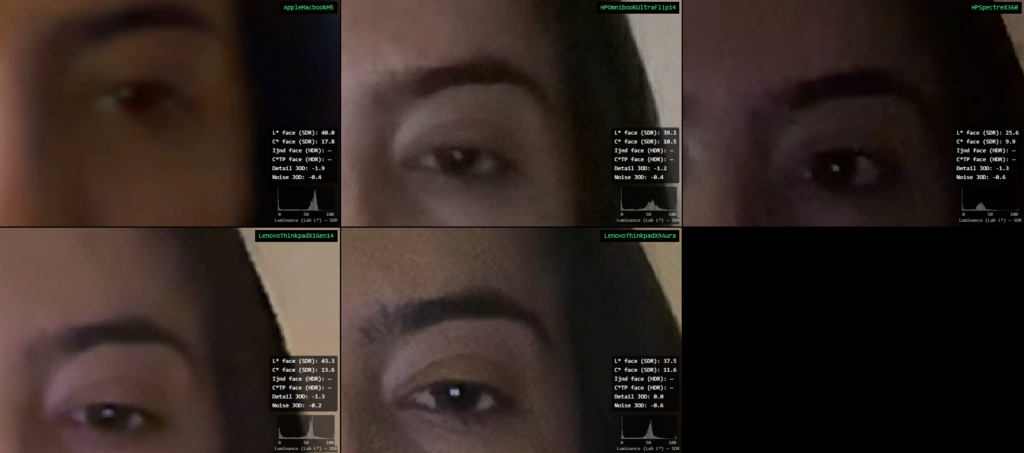
Rather than relying solely on visual inspection, GEA quantifies these differences using a Face Texture JOD score. The resulting metric provides an objective, perceptually grounded measurement of texture reproduction and sharpness.
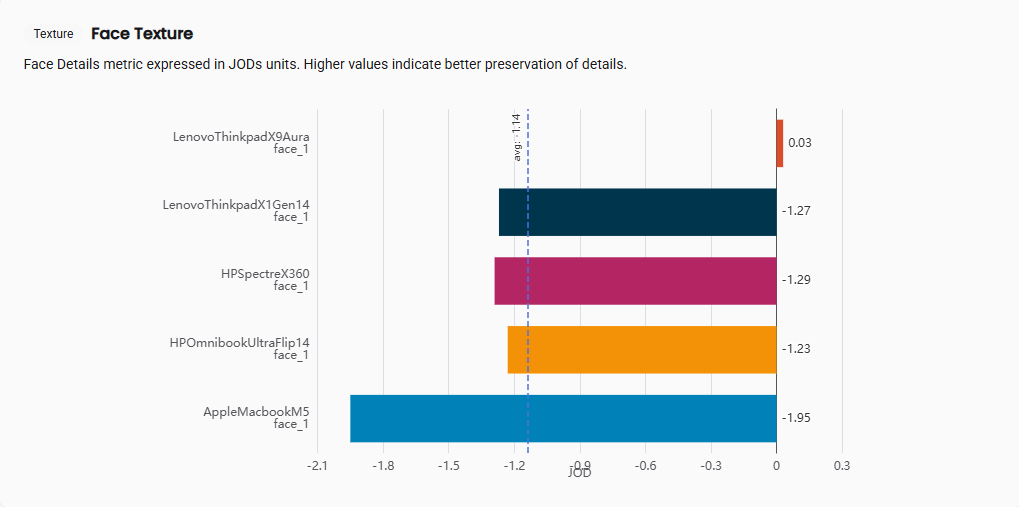
This allows engineering teams to benchmark devices consistently and track improvements throughout product development.
Face Noise: Detecting and Quantifying Visual Artifacts
Image noise is another critical factor influencing perceived image quality, particularly in challenging lighting conditions.
When focusing on facial regions such as the forehead, several differences become apparent.
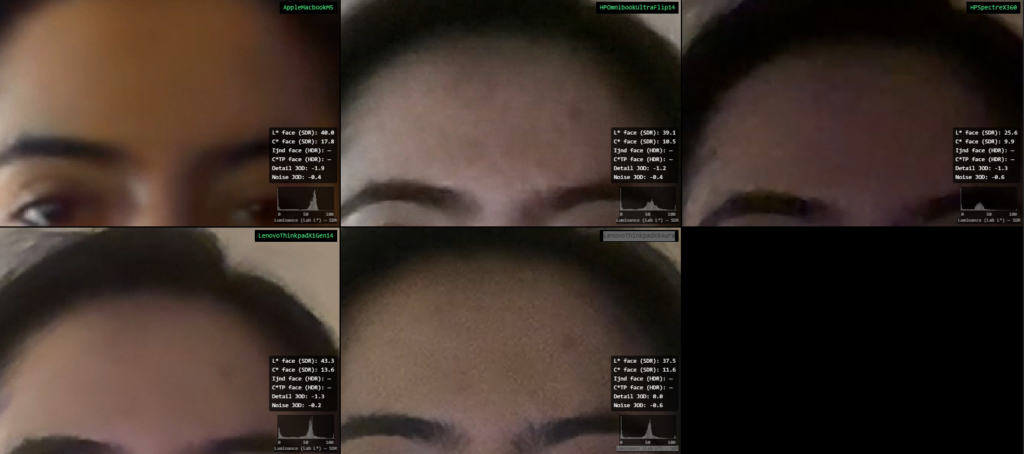
The Lenovo X9 Aura exhibits visible luminance noise, while the HP Spectre x360 shows chromatic noise artifacts. In comparison, the Lenovo X1 Gen 14 demonstrates stronger noise control in this scene.
GEA automatically detects and quantifies these artifacts, generating a Face Noise JOD score that can be compared across devices, software versions, and test conditions.
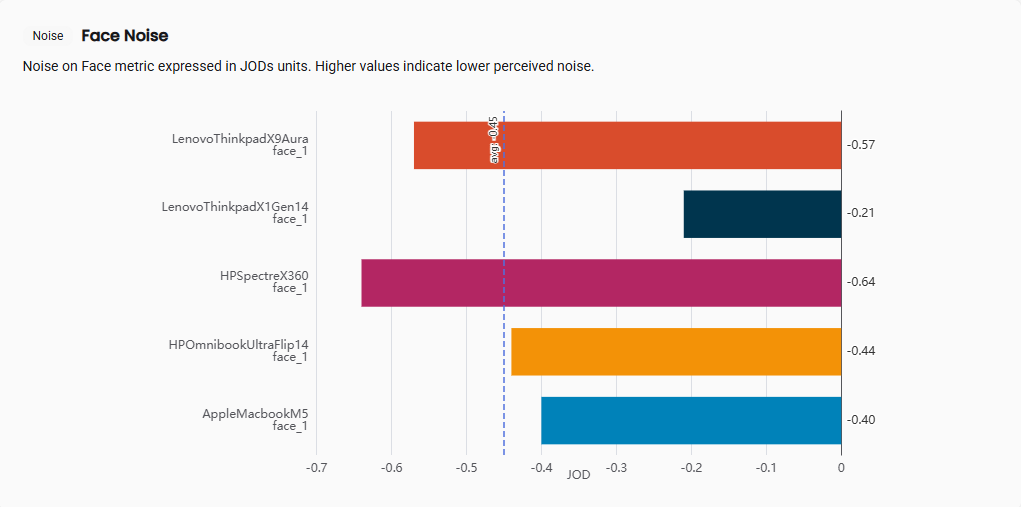
By replacing subjective observations with objective measurements, teams can prioritize optimization efforts more effectively and monitor progress over time.
Skin Color: Understanding Color Rendering Choices
Skin-tone rendering is one of the most visible aspects of image quality during video calls. Small differences in color processing can significantly influence how natural or flattering a subject appears on screen.
GEA automatically analyzes every detected face within a scene and measures the dominant skin-tone position in the chromatic plane, enabling direct comparison between devices.
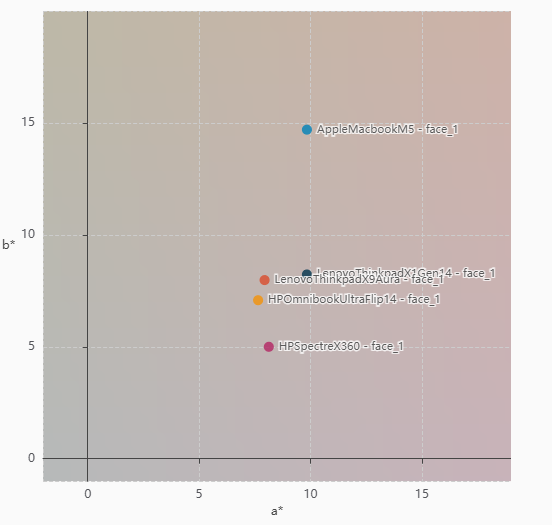
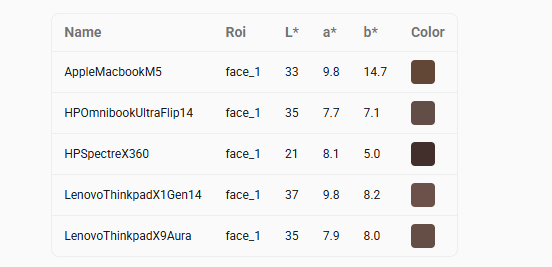
In this example, the MacBook Pro M5 and the Windows-based devices demonstrate distinct approaches to skin-tone rendering. Quantifying these differences rather than relying on visual inspection alone enables manufacturers to monitor tuning strategies, identify rendering trends, and better understand how image signal processing decisions affect the user experience.
Why Objective Perceptual Metrics Matter
For image-quality teams, perceptual evaluation often represents a bottleneck between image capture and product decisions. Subjective reviews can be difficult to reproduce, datasets continue to grow, and evaluating every image manually is rarely feasible.
GEA helps solve this challenge by providing:
- Objective and repeatable perceptual measurements
- Consistent benchmarking across devices and generations
- Faster analysis of large image datasets
- Quantitative tracking of image-quality improvements
- Actionable insights for camera and ISP tuning
The result is a more efficient development process and greater confidence in image-quality decisions.
Built for Scale
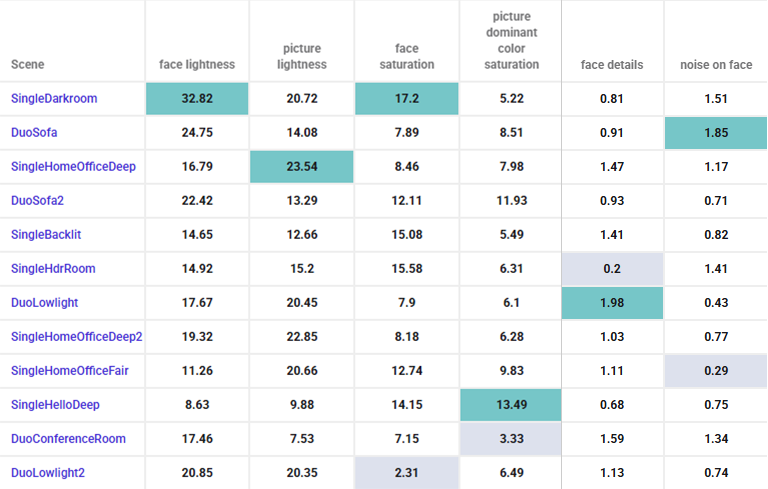
GEA is built to support large evaluation campaigns, covering multiple devices across hundreds or even thousands of test scenes. The interface gives engineers and analysts a fairly complete view of scenes, metrics, and device results, and results can be exported to JSON for use in your own analytics, reporting, or benchmarking tools.
The same tool works just as well for a smaller team running a handful of scenes on an occasional basis. There’s no ramp-up, no calibration period, no need to build out an image quality function before getting a first read on a device. GEA draws on the same perceptual expertise DXOMARK has built over 20 years of expert evaluation, available whenever a team needs it.
If you’d like to see what GEA could do on your own devices, feel free to get in touch and we can set up a demo.
Discover GEA
Golden Eye Assistant brings objective, scalable perceptual image-quality analysis to real-world images, helping manufacturers measure what users actually see.
Interested in evaluating your own devices with GEA? Contact DXOMARK to schedule a demo and discover how AI-powered perceptual analysis can accelerate your image-quality evaluation process.
Contact us